- Página de inicio /
- Electrónica /
- Computer Accessories /
- Computer Components /
- Laptop Replacement Parts /
- DC Power Jack with Cable for Dell M15 R2/ M17...
0 ratings


Nº de artículo:
143738970
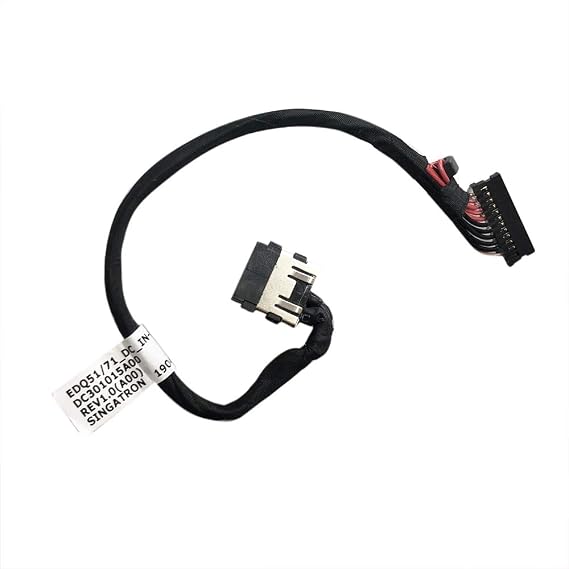
DC Power Jack with Cable for Dell M15 R2/ M17 R2 J60G1 DC301015A00
Nº de artículo:
143738970
DOP 1173
Price Details
Excluding Shipping & Custom charges ( Shipping and custom charges will be calculated on checkout )
*All items will import from Estados Unidos
0 ratings
Escribe una opinión
En stock
 Importado de la tienda USA
Haz tu pedido ahora y recíbelo por ahí Miércoles, Septiembre 30
Secured transaction
Ubuy works hard to protect your security and privacy. Our advanced payment security system ensures confidentiality by encrypting your information during transmission using AES (Advanced Encryption Standards) and SSL (Secure Socket Layer) protocols. Your payment details are 100% secure as we do not share your payment details with third party sellers.
Our Top Logistics Partners


100% Brand new and high quality, tested before shipping.

Fast
Shipping

Free
Return*

Secure Packaging

100% Original Products

PCI DSS Compliance

ISO 27001 Certified



What Stands Out
High Compatibility
Specifically designed for Dell M15 R2 and M17 R2 models, ensuring a perfect fit and seamless performance compared to generic alternatives.
Durable Construction
Built with high-quality materials to withstand daily wear and tear, enhancing longevity and maintaining reliable performance over time.
Easy Installation
User-friendly design allows for quick and hassle-free installation, making it ideal for anyone looking to replace their power jack without professional assistance.
Detalles de producto
| Connector Type | Micro Usb, Dc Barrel Jack |
| Cable Type | Micro-USB |
| Compatible Devices | Laptop |
| Other Special Features of the Product | Special Installation Required |
| Compatible Phone Models | Dell Alienware M15 R2, Dell Alienware M17 R2 |
| Connector Gender | Male-to-Female |
| Number of Pins | 2 |
| Maximum Voltage | 19 volts_of_direct_current |
| Recommended Uses For Product | Power supply for laptops |
| Indoor Outdoor Usage | Indoor, Outdoor |
| Item Shape | Round |
| Brand Name | GinTai |
| Model | NE07165-1 |
| Manufacturer | GINTAI |
| UPC | 192771211829 |
| Part Number | NE07165-1 |
| Unit Count | 1 Count |
| Item Weight | 0.01 kg |
| Brand | GinTai |
| Special Feature | Special Installation Required |
Who Should Buy?

-
Dell Laptop Owners
Ideal for Dell M15 R2 and M17 R2 users needing a reliable charging port replacement for their devices.
-
DIY Repair Enthusiasts
Perfect for individuals who enjoy fixing electronic devices at home and have basic technical skills.
-
Budget-Conscious Users
A cost-effective solution for users looking to avoid expensive repairs or replacements from service centers.

-
Non-Technical Users
Not suitable for individuals lacking technical skills or experience with laptop repairs and components replacement.
DESCRIPCIÓN DEL PRODUCTO
DC Power Jack with Cable for Dell M15 R2/ M17 R2 J60G1 DC301015A00
¿Tienes alguna consulta? Chatea con nosotros
Preguntas y respuestas de los clientes
-
Pregunta:
What is the GinTai DC Power Jack used for?
Respuesta: The GinTai DC Power Jack is a crucial component for Dell M15 R2 and M17 R2 laptops, functioning as the connection point for your laptop's power supply. When the original power jack becomes damaged or stops working, replacing it with this model ensures your laptop receives the necessary power. This is especially important for gaming or demanding tasks where uninterrupted power is essential. -
Pregunta:
How do I install the GinTai DC Power Jack?
Respuesta: Installing the GinTai DC Power Jack requires some technical skill, as you will need to disassemble your laptop. First, ensure the laptop is powered down and disconnected from any power source. Carefully open the laptop's casing, locate the old power jack, and unscrew it. Then, position the new jack securely and reconnect it. This replacement can restore functionality for users experiencing charging issues with their Dell M15 R2 or M17 R2. -
Pregunta:
Is the GinTai DC Power Jack compatible with other Dell models?
Respuesta: The GinTai DC Power Jack is specifically designed for Dell M15 R2 and M17 R2 models. While other Dell laptops may have similar power jacks, compatibility can vary significantly due to design differences. It's essential to check your laptop model and the specifications of the power jack to ensure proper functionality and fit. -
Pregunta:
What tools will I need to replace the GinTai DC Power Jack?
Respuesta: To replace the GinTai DC Power Jack, you will typically need a set of small screwdrivers (usually Phillips or Torx), a plastic opening tool, and possibly a pair of tweezers. Having these tools on hand will allow you to safely and effectively open your laptop's casing and handle the components without causing damage. -
Pregunta:
Can I test the GinTai DC Power Jack before installing it?
Respuesta: Testing the GinTai DC Power Jack directly before installation is not feasible due to its integrated design and the need for it to be connected to the motherboard. However, you can visually inspect the jack for any physical defects or damage. Once installed, if you encounter issues, you might want to troubleshoot your laptop's power supply to ensure the problem is with the jack. -
Pregunta:
What should I do if my laptop does not recognize the new power jack?
Respuesta: If your laptop does not recognize the newly installed GinTai DC Power Jack, first confirm all connections are secure and correctly placed. It's possible that internal cables were disconnected or improperly reconnected during the installation. If the issue persists, check for any additional power supply issues unrelated to the power jack, or consult a professional technician for further diagnosis. -
Pregunta:
How can I extend the life of my GinTai DC Power Jack?
Respuesta: To extend the life of your GinTai DC Power Jack, avoid forcing the power connector into the jack, as this can cause wear and damage. Additionally, regularly clean the area around the power jack to prevent dust accumulation, which can inhibit connectivity. Using the laptop on hard surfaces instead of soft ones can also minimize movement that may loosen connections over time. -
Pregunta:
What are the signs that my GinTai DC Power Jack needs replacing?
Respuesta: Signs that your GinTai DC Power Jack may need replacing include intermittent power connections, visible damage or wear around the jack area, or a failure to charge the laptop even when a compatible power source is plugged in. If you experience flickering power or need to adjust the power connector for the laptop to charge, these are indicators that a replacement could be necessary. -
Pregunta:
Where can I buy GinTai DC Power Jack With Cable For Dell M15 R2/ M17 R2 J60G1 DC301015A00?
Respuesta: You can buy the GinTai DC Power Jack With Cable for Dell M15 R2 and M17 R2 at Ubuy. Ubuy offers a reliable shopping experience and a variety of tech accessories including power components, ensuring you get the right part for your device needs in Dominican Republic. -
Pregunta:
Is the cable included with the GinTai DC Power Jack?
Respuesta: Yes, the GinTai DC Power Jack comes with the necessary cable specifically tailored for use with Dell M15 R2 and M17 R2 models. This inclusion ensures that you have all the components needed for a complete installation. Having the appropriate cable means you can easily and effectively connect the power jack to the motherboard for optimal performance.
GinTai Laptop Replacement Parts Editorial Review
No se encontraron reseñas editoriales
Customer Reviews & Ratings
1 valoraciones de los clientes
-
5 estrella
100%
-
4 estrella
0%
-
3 estrella
0%
-
2 estrella
0%
-
1 estrella
0%
Revisar este producto
Comparte tus ideas con otros clientes
ventajas
- High quality materials
- User-friendly design
- Excellent performance
- Stylish appearance
- Great customer support
Contras
- A bit heavier than expected.
Platform Trust & Buyer Confidence

JK
Jasmin
Verified buyer
“Great products and very good service: very easy and very fast international delivery.”
9 September 2026 · via Trustpilot
AG
Anke
Verified buyer
“Wonderful online shopping experience, smooth transaction from the start. Payment method works conveniently and delivery is unexpectedly fast and reliable. You go the extra mile for service. What makes this even more amazing, you deliver to Namibia. I will remain a happy Ubuy customer and will increase my purchases for sure! Thank you!”
10 September 2026 · via Trustpilot
H
Hazel
Verified buyer
“Very easy to find the products what you need, and so fast delivery, that’s why I highly recommended to others costumers to used ubuy.”
10 September 2026 · via Trustpilot
O
Opaleye
Verified buyer
“I received exactly what I ordered I was skeptical about your site because that was my first time to order. But the order came timely and neatly packaged. I was not disappointed. Thank you.”
11 September 2026 · via Trustpilot
AC
Adele
Verified buyer
“Easy to find and order what you want on the website. Delivery is quick to the UK”
8 September 2026 · via Trustpilot
Pago seguro
Global Delivery
Easy Returns
Genuine Products
Product Price History
Información importante
- Limitaciones: Para los productos enviados al extranjero, ten en cuenta que cualquier garantía del fabricante puede no ser válida; las opciones de servicio del fabricante pueden no estar disponibles; los manuales del producto, las instrucciones y las advertencias de seguridad pueden no estar en los idiomas del país de destino; los productos (y los materiales que los acompañan) pueden no estar diseñados de acuerdo con las normas, especificaciones y requisitos de etiquetado del país de destino; y los productos pueden no ajustarse al voltaje del país de destino y a otras normas eléctricas (lo que requiere el uso de un adaptador o convertidor, si procede). El destinatario es responsable de asegurarse de que el producto puede ser importado legalmente al país de destino. Cuando hagas un pedido a Ubuy o a sus filiales, el destinatario es el importador registrado y debe cumplir todas las leyes y normativas del país de destino.
- No todos los productos que aparecen en Ubuy están a la venta, ya que Ubuy es un motor de búsqueda a nivel mundial. Los productos están sujetos a las normas de exportación/comercio.
DOP 1173
Haz tu pedido ahora y recíbelo por ahí Miércoles, Septiembre 30
This item is not restrict in my country.(Please click on above link if this item is not restrict in your country, So our team will review and allow.)
QTY:
Secured transaction
PCI DSS compliant and ISO 27001:2022 certified, with encrypted payments and full buyer protection on every order.
Our Top Logistics Partners
Fastest cross-border delivery
características y beneficios
- Compatible with Dell M15 M17 R2 models.
- Includes one DC Power Jack with Cable Socket Plug.
- 100% brand new, ensuring high quality.
- Tested before shipping for reliability.
- Easy replacement for faulty or broken parts.
- Customer support available for any questions.
Ubuy Assurance
Experience worry-free shopping with 100% original products, PCI DSS-compliant payment security, ISO 27001-certified data protection, the fastest cross-border delivery, free returns *, and secure packaging on every order.