- Página de inicio /
- Arts Crafts & Sewing /
- Scrapbooking & Stamping Supplies /
- Die-Cutting & Embossing /
- Die-Cut Machines /
- Cricut Foil Transfer Tool Tips, Explore Maker...
0 ratings




Nº de artículo:
257205036
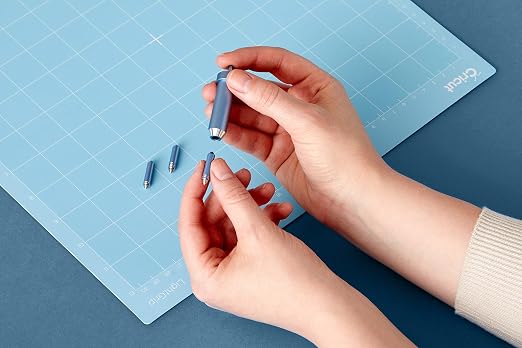
Cricut Foil Transfer Tool Tips, Explore Maker Machines, Replacement Blades
Nº de artículo:
257205036
DOP 1845
Price Details
Excluding Shipping & Custom charges ( Shipping and custom charges will be calculated on checkout )
*All items will import from Estados Unidos
En stock
 Importado de la tienda USA
QTY:
Haz tu pedido ahora y recíbelo por ahí Martes, Septiembre 29
Secured transaction
Ubuy works hard to protect your security and privacy. Our advanced payment security system ensures confidentiality by encrypting your information during transmission using AES (Advanced Encryption Standards) and SSL (Secure Socket Layer) protocols. Your payment details are 100% secure as we do not share your payment details with third party sellers.
Our Top Logistics Partners


3-in-1 tool for stunning foil effects on a variety of projects

Fast
Shipping

Free
Return*

Secure Packaging

100% Original Products

PCI DSS Compliance

ISO 27001 Certified



Detalles de producto
| Brand Name | Cricut |
| Manufacturer | Cricut |
| Unit Count | 1 Count |
| UPC | 093573535512 |
| Number of Items | 1 |
| Item Type Name | Foil Transfer Tool Replacement Tips |
| Model | 2008728 |
| Part Number | 2008728 |
| Operation Mode | Manual |
| Print media | Paper (plain) |
| Compatible Devices | Cricut Maker, Cricut Explore |
| Active Surface Area | 11.5 x 8.5 inches |
| Item Weight | 50 g |
| Material Type | Metall |
| Color | For Cricut Explore and Cricut Maker Machines |
| Brand | Cricut |
| Material | Metall |
DESCRIPCIÓN DEL PRODUCTO
¿Tienes alguna consulta? Chatea con nosotros
Preguntas y respuestas de los clientes
-
Pregunta:
What is the Cricut Foil Transfer Tool and how does it work?
Respuesta: The Cricut Foil Transfer Tool is designed to help you add metallic foil accents to your projects with precision. It works by using a heat-sensitive adhesive to apply foil onto cardstock or other surfaces. You simply load the tool into your Cricut machine, choose a design, and let the machine create beautiful, intricate foil patterns. This tool is fantastic for enhancing greeting cards, scrapbook pages, or customized gifts, bringing a touch of elegance and shine that makes your projects stand out. -
Pregunta:
What types of tips are available for the Cricut Foil Transfer Tool?
Respuesta: The Cricut Foil Transfer Tool comes with three distinct tips: the fine tip for detailed designs, the medium tip for standard coverage, and the bold tip for larger areas. Each tip allows you to create a variety of effects with metallic foil, catering to different styles and project needs. Choosing the right tip is essential for achieving the desired look; for instance, the fine tip is ideal for intricate lettering, while the bold tip is perfect for dramatic backgrounds or accent details. -
Pregunta:
How do I replace the blades in my Cricut machine?
Respuesta: Replacing the blades in your Cricut machine is a straightforward process. First, ensure your machine is powered off. Open the blade housing and carefully remove the old blade by grasping its top. Insert the new blade into the housing, making sure it fits snugly, and close the housing. Proper blade maintenance is key for achieving clean cuts in various materials, from cardstock to vinyl. Regularly replacing the blades ensures that your projects maintain a professional finish. -
Pregunta:
Can I use Cricut Foil Transfer Tool Tips with all Cricut machines?
Respuesta: The Cricut Foil Transfer Tool tips are compatible primarily with the Cricut Maker and Cricut Explore series. It's important to check that your specific machine is up to date with the software necessary to utilize these tips effectively. Using the Foil Transfer Tool can significantly elevate your crafting by adding unique, eye-catching elements to your designs. For best results, ensure you use suitable materials for foil application, enhancing both the visual appeal and quality of your projects. -
Pregunta:
What materials can I use the Cricut Foil Transfer Tool on?
Respuesta: You can use the Cricut Foil Transfer Tool on a variety of materials, including cardstock, acetate, and even some types of leather. Each material produces different results; for example, cardstock allows for vibrant accents, while acetate provides a subtle, elegant glow. When selecting materials, consider the project’s purpose and aesthetic. This versatility enables crafters to experiment with different textures and finishes, making it easier to create personalized items for any occasion. -
Pregunta:
How do I ensure the optimal use of Cricut Replacement Blades?
Respuesta: To ensure optimal use of Cricut Replacement Blades, regularly check for signs of dullness or wear, especially after extensive project use. Store them in a protective case to prevent damage and use a self-healing mat to prolong their lifespan. Additionally, select the correct blade type for your material; for example, a fine-point blade is suitable for lightweight materials, while a deep-point blade is ideal for thicker materials. This will help maintain clean and precise cuts, enhancing the overall quality of your crafting. -
Pregunta:
How does the Cricut Explore Maker machine differ from previous models?
Respuesta: The Cricut Explore Maker machine offers advanced features, such as adaptive tool technology that allows for a wider range of tools and capabilities compared to previous models. It can cut, write, and score with ease, adapting to various materials like fabric, vinyl, and leather. This makes it an excellent tool for both beginner and advanced crafters looking to expand their crafting repertoire. Additionally, its enhanced precision and versatility set it apart, allowing users to create complex designs with professional quality. -
Pregunta:
What are the benefits of using the Cricut Foil Transfer Tool in crafting?
Respuesta: Using the Cricut Foil Transfer Tool brings a professional touch to your crafting projects. Its ability to create shiny, metallic accents can transform ordinary cards, invitations, and decor into stunning pieces of art. The tool is perfect for celebrating special occasions, enhancing gifts, or simply adding a luxurious finish to your designs. Its user-friendly compatibility with Cricut machines makes it accessible for all crafting levels, enabling you to push the boundaries of your artistic creativity. -
Pregunta:
Where can I buy Cricut Foil Transfer Tool Tips, Replacement Blades, Explore Maker Machines in Dominican Republic?
Respuesta: You can purchase Cricut Foil Transfer Tool Tips, Replacement Blades, and Explore Maker Machines in Dominican Republic at Ubuy. Ubuy offers a variety of Cricut products, ensuring you can find the right tools for all your crafting needs. With easy navigation and a wide selection, you can easily explore different Cricut options to elevate your creativity. -
Pregunta:
Are there any tutorials available for using the Cricut Foil Transfer Tool?
Respuesta: Yes, there are numerous tutorials available online for using the Cricut Foil Transfer Tool. Many crafters share their experiences and techniques on platforms like YouTube, blogs, and social media. These resources provide step-by-step guidance on setting up your machine, choosing materials, and getting the best results with foil transfer. Engaging with these tutorials can help you learn innovative ways to incorporate the tool into your projects, inspiring creativity and enhancing your crafting skills.
Cricut Die-Cut Machines Editorial Review
No se encontraron reseñas editoriales
Customer Reviews & Ratings
76 valoraciones de los clientes
-
5 estrella
72%
-
4 estrella
13%
-
3 estrella
8%
-
2 estrella
0%
-
1 estrella
7%
Revisar este producto
Comparte tus ideas con otros clientes
Platform Trust & Buyer Confidence

JK
Jasmin
Verified buyer
“Great products and very good service: very easy and very fast international delivery.”
9 September 2026 · via Trustpilot
AG
Anke
Verified buyer
“Wonderful online shopping experience, smooth transaction from the start. Payment method works conveniently and delivery is unexpectedly fast and reliable. You go the extra mile for service. What makes this even more amazing, you deliver to Namibia. I will remain a happy Ubuy customer and will increase my purchases for sure! Thank you!”
10 September 2026 · via Trustpilot
H
Hazel
Verified buyer
“Very easy to find the products what you need, and so fast delivery, that’s why I highly recommended to others costumers to used ubuy.”
10 September 2026 · via Trustpilot
O
Opaleye
Verified buyer
“I received exactly what I ordered I was skeptical about your site because that was my first time to order. But the order came timely and neatly packaged. I was not disappointed. Thank you.”
11 September 2026 · via Trustpilot
AC
Adele
Verified buyer
“Easy to find and order what you want on the website. Delivery is quick to the UK”
8 September 2026 · via Trustpilot
Pago seguro
Global Delivery
Easy Returns
Genuine Products
Product Price History
Información importante
- Limitaciones: Para los productos enviados al extranjero, ten en cuenta que cualquier garantía del fabricante puede no ser válida; las opciones de servicio del fabricante pueden no estar disponibles; los manuales del producto, las instrucciones y las advertencias de seguridad pueden no estar en los idiomas del país de destino; los productos (y los materiales que los acompañan) pueden no estar diseñados de acuerdo con las normas, especificaciones y requisitos de etiquetado del país de destino; y los productos pueden no ajustarse al voltaje del país de destino y a otras normas eléctricas (lo que requiere el uso de un adaptador o convertidor, si procede). El destinatario es responsable de asegurarse de que el producto puede ser importado legalmente al país de destino. Cuando hagas un pedido a Ubuy o a sus filiales, el destinatario es el importador registrado y debe cumplir todas las leyes y normativas del país de destino.
- No todos los productos que aparecen en Ubuy están a la venta, ya que Ubuy es un motor de búsqueda a nivel mundial. Los productos están sujetos a las normas de exportación/comercio.
DOP 1845
Haz tu pedido ahora y recíbelo por ahí Martes, Septiembre 29
This item is not restrict in my country.(Please click on above link if this item is not restrict in your country, So our team will review and allow.)
QTY:
Secured transaction
PCI DSS compliant and ISO 27001:2022 certified, with encrypted payments and full buyer protection on every order.
Our Top Logistics Partners
Fastest cross-border delivery
características y beneficios
- Achieve stunning foil effects effortlessly.
- No heat is required for embellishing projects.
- Polished and long-lasting results for professional finishes.
- Compatible with Cricut Maker and Cricut Explore machines.
- Requires Cricut Foil Transfer Tool Housing & Foil Transfer Sheets (sold separately).
- Perfect for a wide range of craft projects.
Ubuy Assurance
Experience worry-free shopping with 100% original products, PCI DSS-compliant payment security, ISO 27001-certified data protection, the fastest cross-border delivery, free returns *, and secure packaging on every order.